Ad · This page contains affiliate links. How that works
Baby monitor review: LeapFrog LF915HD
We've used this every night since our daughter moved into her own room (we didn't need it while she was in with us). No WiFi, no app, no subscription - you just plug it in and go. It's not perfect and there's a bit of a knack to it, but if it broke tomorrow I'd buy the same one again.
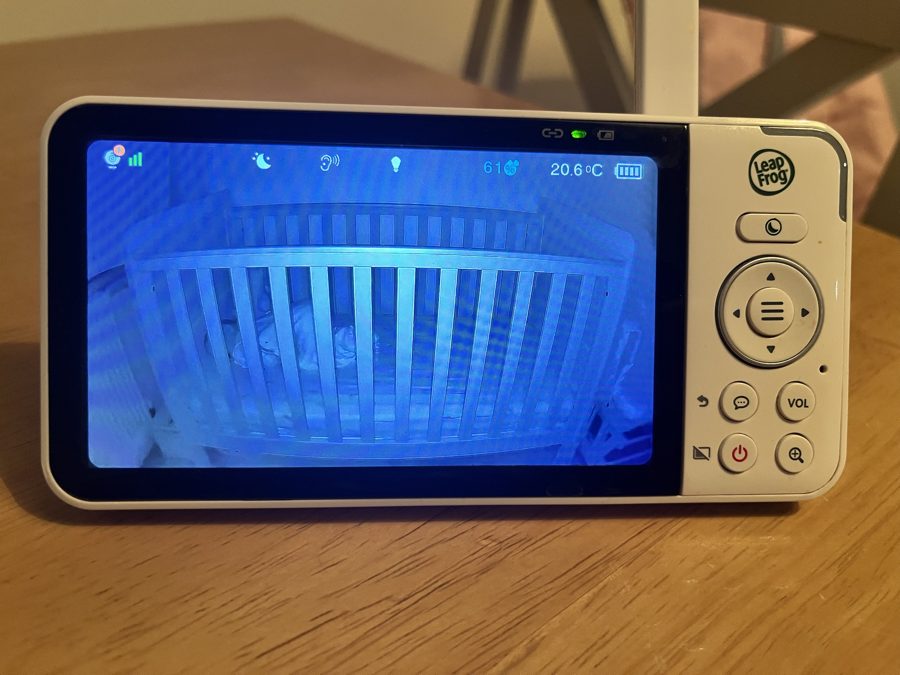
"If it broke tomorrow I'd buy the same one again."
- What we paid
- £109.99
- Bought from
- John Lewis
- Using since
- She moved to her own room, still going
- Buy again?
- Yes
Why we chose a monitor with no WiFi
We didn't want a WiFi monitor. You read absolute horror stories of them getting hacked and people talking to babies through them. I know it's an edge case and probably doesn't happen loads in reality, but for us it just wasn't a risk we were willing to take.
This one doesn't go anywhere near your home WiFi - the camera and the screen talk to each other on their own encrypted connection, so there's nothing on the internet for anyone to get into.
We also thought an app was overkill. If it was on our phones one of us would always be checking it, even when we were just out doing errands and the other one was home with her. Completely unnecessary.
We looked at VTech, Tommee Tippee and loads of the different LeapFrog ones. Price honestly wasn't the driver - it was all about avoiding those horror stories.
What's brilliant
- It's so easy to set up. You literally just plug it in, turn it on and it connects to the screen. What you don't really think about is how handy that is away from home. If she's napping at my mum and dad's or a friend's house you're not messing around trying to get on their WiFi - it's just plug in and play.
- Night vision. There's a button on the main part of the monitor to flick between colour and black and white. Still super easy. We keep it on black and white because her room's always dark when she's asleep.
- Pan, tilt and zoom. The pan and tilt genuinely works fine and the zoom is really useful when you're trying to work out if she's awake, moving about or if her eyes are open.
- The alert lights are clever. A small noise flashes a little green light without waking up the whole screen. Anything big flashes red and the screen comes on. So it doesn't wake you up for every little thing, but if you're half awake and see it flash you can have a look if you want.
- Volume and brightness. You can turn both up and down, so when she wakes in the night it wakes you up without blinding you or deafening you.
- The range is really good. I can be mowing the lawn or washing the car out the front while my partner's inside and it still stays connected. Our garden's not the biggest but it works right round the back and down the corner too.
- Battery. It easily does a full night off the charger. We just charge it once a day to be safe.
- Temperature. It's not that accurate (we've got a Gro-egg for that) but it's a handy extra check so you don't have to go into the room.
What annoyed us
There's a bit of a knack to connecting it. You have to turn the camera on first, let the light come up and then turn the monitor on. If you do it the other way round it tends not to connect.
Even when you do it right, sometimes it just drops out or won't connect. It seems to be a common fault with this model. It's really annoying if she's not settled and crying - you can't see her or what she's moaning about, so you have to go in, disturb her, turn the camera off, wait 10 or 15 seconds and turn it back on. That can unsettle her even more. We get round it by making sure it's properly connected before we go to sleep. It just becomes part of your bedtime routine and you get on with it.
The camera's also started coming away from its base. The top bit that swivels is coming away from the bottom bit where the wires go. She's about 13 months and it's out of warranty, so one day the wiring will probably come loose and we'll need a new one. I'll be getting the same model though.
The only other thing is the talk button. Early on I pressed it a few times by accident instead of zoom. We don't use the two-way talk anyway because it might wake her, and once you know where it is it's not an issue.
Settings worth changing
In the settings you can pick whether alerts go off for movement or sound. We turned movement off because our little one rolls about loads at night and it was waking us up every time. Sound only is much better.
It's got lullabies and white noise on it too. We've chosen not to use them but I know friends do.
What I wish I'd known
The knack! If I'd known from day one to turn the camera on first and let it settle before the monitor, it would have saved me disturbing a few of her naps.
Tips if you buy one
- Camera on first. Let the light come up, then turn the monitor on.
- Check it's connected before you go to bed. Not when she's already crying.
- Turn movement alerts off if your little one rolls about a lot.
- Turn the volume and brightness down so it wakes you without blasting you.
The verdict
It's really good. It's not perfect - there's a knack to it and the connection isn't flawless - but once you know the routine you just get on with it. No WiFi gives us proper peace of mind and it works wherever we take it.
Verdict: Essential. If it broke tomorrow I'd buy the same model again and I think that says everything you need to know.
Prices change often. Check the retailer for today's price.